Artificial Intelligence (AI) is changing the way people learn, work, and create content. Today, many AI tools can help you write faster, design better, solve problems, and save time. If you are new to AI, choosing the right tool can feel confusing because there are so many options available. Best AI Tools For Beginners, Will help you understand what AI tools are, how they work, and which ones are the easiest to start with. You will also learn their features, benefits, practical uses, and simple tips to use them with confidence, even if you have no previous experience.
Why AI Tools Are Becoming Essential
AI tools are becoming an important part of everyday life because they help people complete tasks faster, more accurately, and with less effort. Students use AI to learn new topics, professionals use it to improve productivity, and businesses use it to save time and reduce costs. Even beginners can use AI tools without having advanced technical skills. One of the biggest reasons AI tools are becoming essential is their ability to automate repetitive work. Instead of spending hours writing, researching, designing, or organizing information, users can complete many tasks in just a few minutes. This allows them to focus on learning, creativity, and making better decisions.
Things to Know Before Choosing an AI Tool
Before selecting an AI tool, compare a few important factors to make the right choice for your needs.
- Know Your Goal: Decide if you need AI for writing, learning, design, or work.
- Choose an Easy Tool: Pick a tool with a simple interface for quick learning.
- Check Free and Paid Features: Start with the free version before upgrading.
- Compare Features: Make sure the tool offers the features you need.
- Read User Reviews: Check reviews to learn about real user experiences.
- Protect Your Privacy: Avoid sharing personal or sensitive information.
- Check Device Compatibility: Ensure the tool works on your computer or phone.
- Look for Regular Updates: Updated tools are usually safer and more useful.
By checking these simple points, beginners can choose an AI tool that is easy, safe, and suitable for their daily tasks.
Best AI Tools for Beginners
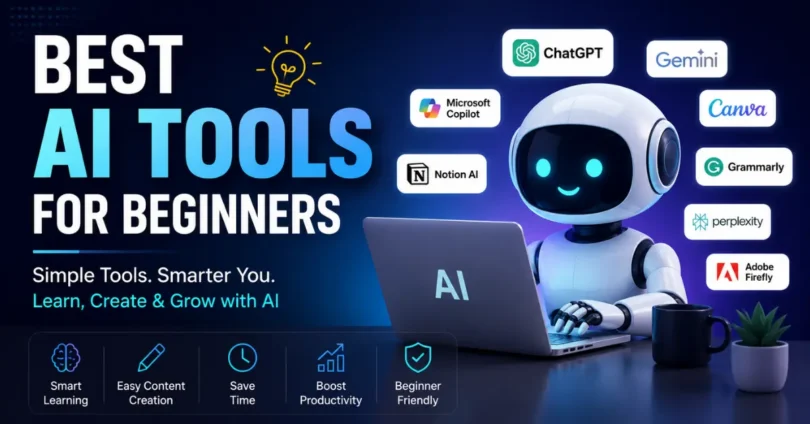
Many AI tools are easy to use and help beginners save time, learn faster, and complete daily tasks more efficiently.
- ChatGPT
- Google Gemini
- Microsoft Copilot
- Canva AI
- Grammarly AI
- Notion AI
- Perplexity AI
- Adobe Firefly
These beginner friendly AI tools are simple to learn and can improve your productivity, creativity, and everyday work.
How to Start Using AI Tools for the First Time
Starting with AI tools is easy if you follow a few simple steps. These tips will help beginners learn faster and use AI with confidence.
Choose One AI Tool: Start with one beginner-friendly tool instead of many.
Create a Free Account: Sign up to access the tool and its basic features.
Learn the Main Features: Explore the dashboard and understand how it works.
Write Simple Prompts: Ask clear and short questions to get better answers.
Practice Every Day: Use the tool regularly to improve your skills.
Check AI Responses: Always review the answers before using them.
Try Small Projects: Practice with simple tasks like writing, research, or design.
Keep Learning: Watch tutorials and test new features as you gain experience.
By following these simple steps, beginners can start using AI tools confidently and improve their skills over time.
Practical Uses of AI Tools in Everyday Life
AI tools can make daily tasks easier, faster, and more productive for people of all ages.
- Writing Content: Create articles, emails, and social media posts quickly.
- Learning and Studying: Understand difficult topics and complete homework faster.
- Graphic Design: Make logos, posters, and presentations with ease.
- Research: Find information and summarize long articles in minutes.
- Translation: Translate text into different languages instantly.
- Business Tasks: Create reports, marketing ideas, and business plans.
- Coding Help: Generate code, fix errors, and learn programming basics.
- Time Management: Plan daily tasks, reminders, and schedules more efficiently.
AI tools are useful for everyday life because they help save time, improve productivity, and make work easier for beginners and professionals alike.
Tips to Learn AI Faster
Learning AI becomes easier when you practice regularly and use the right learning methods.
- Start with One AI Tool: Focus on one tool before trying others.
- Practice Every Day: Spend a few minutes using AI daily.
- Learn Prompt Writing: Write clear prompts to get better results.
- Watch Tutorials: Learn from beginner-friendly videos and guides.
- Try Real Projects: Use AI for writing, studying, or simple tasks.
- Explore New Features: Test updates and tools to improve your skills.
- Keep Learning: Stay updated with the latest AI trends and tips.
Conclusion: Regular practice and continuous learning are the best ways to master AI tools quickly and confidently.
Common FAQs about Best AI Tools for Beginners
Here are some Faqs of Best AI Tools for Beginners:
Can AI tools work without an internet connection?
Most AI tools need an internet connection because they process information on cloud servers. However, some desktop AI applications offer limited offline features.
Do AI tools support multiple languages?
Yes, many AI tools can understand and generate content in multiple languages, making them useful for users around the world.
Can AI tools help improve creativity?
Yes. AI can suggest new ideas, create outlines, generate images, and provide inspiration, but your own creativity is still important for the best results.
How often are AI tools updated?
Most popular AI tools receive regular updates that improve performance, add new features, and fix bugs to provide a better user experience.
Can AI tools be used on mobile devices?
Yes. Many AI tools have Android and iPhone apps, allowing users to work, study, and create content from anywhere.
Is it necessary to create an account to use AI tools?
Some AI tools can be used without signing in, but creating an account usually gives access to more features and lets you save your work.
Can AI tools work together with other software?
Yes. Many AI tools integrate with apps like email services, office software, design platforms, and project management tools to improve workflow.
How can I stay updated with new AI tools?
Follow official AI websites, technology blogs, YouTube channels, and newsletters to learn about the latest AI tools and new features.
Conclusion
AI tools are making learning, working, and creating content easier than ever. By choosing the right tool, learning the basics, and practicing regularly, beginners can improve their skills and save valuable time. The Best AI Tools for Beginners offer simple features that help with writing, design, research, productivity, and many everyday tasks. Start with one tool, explore its features step by step, and keep learning as your confidence grows. With regular practice, AI can become a powerful assistant that helps you achieve better results in both your personal and professional life.